
Turning Conversations into Customers
The WhatsApp AI platform that automates conversations and manages customers—all in one!
Start for Free Now
Free Trial Lifetime | No Credit Card Needed
Broadcast
AI Chatbot
AI Follow Up
Live Chat
Automation
Wabot Can Be Used With:








Wabot Mobile App
- Full visibility, always in control
- Real-time notifications, easy tracking & monitoring
- Improved efficiency and seamless automation performance
Download now & join our waiting list for beta testers.


AI Chatbot
- Acts like your sales team, guiding every lead to close.
- Always on: 24/7, no rest, no excuses.
- Impact: More deals closed without extra manpower.
AI Follow Up
- Automatically follow up with leads who haven’t responded using your preset scripts.
- Ensure no prospect is left behind even if they reply late.
- Flexible time intervals (e.g., after 1 hour, 24 hours, 3 days).
Send Notification
- Send order & booking alerts straight to WhatsApp.
- 90% open rate — higher than email.
- Easy for customers to respond instantly.
Live Chat
- Manage all customer chats in one place, just like WhatsApp Web.
- Keep conversations flowing even if your team is unavailable.
- Impact: Ensure no lead or enquiry is ever missed.
Broadcast
- Send bulk messages even if customers don’t save your number.
- Upload & schedule — no manual work.
- Impact: Reach more customers effortlessly.
Over 11,500 businesses use Wabot to handle WhatsApp automation — from instant replies to follow-ups, notifications, and bulk messaging.
★★★★★
“I also use the Wabot Chatbot. Nearly 70% of my sales now happen automatically. The AI handles most of the closing. It’s a huge help.”
★★★★★
“Just yesterday I tried setting up Wabot AI. Still in testing mode, I hadn’t even added testimonials yet. Suddenly, two leads got closed as customers—with receipts received too! This product + bot combo is seriously powerful.”
★★★★★
“If you’re looking for a WhatsApp notification system for e-commerce, I strongly recommend Wabot. It’s super easy to use, even if you’re just starting out in e-commerce. The price is affordable, and most importantly, it saves a lot of time because everything is automated. No need to manually WhatsApp customers one by one anymore. Follow-ups, broadcasts, tracking—all automated! Best part, the support team is fast and friendly. Ask anything, and you’ll get answers right away.”
★★★★★
“I was looking for a software that could handle large-scale broadcasts. Alhamdulillah I found Wabot, and I can’t wait to use it.”
Why Businesses in Malaysia Choose Wabot
No Coding! Just Plug & Play
No coding or programming required to use Wabot. Tutorials & support are provided.
Wide Integrations Available
Wabot can connect with multiple platforms like Onpay, WordPress, OrderSini, Shopeegram, and more.

Happy & Confident Customers
Customers don’t have to worry about missing notifications. Unlike email, messages won’t end up in SPAM.
Available 24/7, 365 Days
Wabot operates on the server 24/7, 7 days a week—all year long.

Easy Webhook Setup
Easily connect with various platforms that can trigger webhooks.

Simple to Use
No need for third-party integration platforms like Integrately, Pabbly Connect, or Zapier.
From Retail to Services
Trusted by SME Corp Malaysia to Run on WhatsApp
Online Seller
Crowdfunding
Clinic & Spa

Training Provider

Property Agent

Marketing Agency

Insurance Agent

Fashion Retailer

Flexible Pricing for Every Business
Flexible Pricing for Every Business
Wabot Lite
RM 30 / month
- 1x WhatsApp Number
- 30,000 messages per month
- No Broadcast
- No Chatbot Ai
- No Automation
Wabot Basic
RM 60 / month
- 1x WhatsApp Number
- 100,000 messages per month
- File upload limit: 2 MB
- 100 MB storage
- No Chatbot Ai
Wabot Plus
RM 120 / month
- 1x WhatsApp Number
- Unlimited monthly messages
- File upload limit: 10 MB
- 300 MB storage
- 3,000 Kredit Ai per bulan
Wabot Premier
RM 290 / month
- 3x WhatsApp Numbers
- Est. RM96 per number / month
- Unlimited monthly messages
- File upload limit: 15 MB
- 500 MB storage
- 10,000 AI Credits per month
Wabot Platinum
RM 890 / month
- 10x WhatsApp Numbers
- Est. RM89 per number / month
- Unlimited monthly messages
- File upload limit: 25 MB
- 2 GB storage
- 50,000 AI Credits per month
4 Easy Steps to Use Wabot
4 Easy Steps to Use Wabot
1. Prepare Your Phone
Make sure WhatsApp (regular or Business version) is installed on your phone and the number is activated.
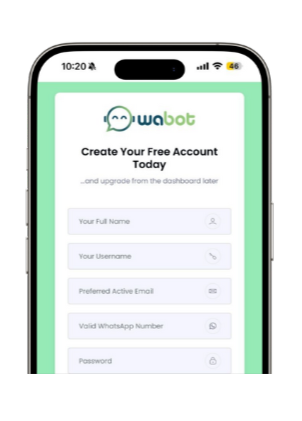
2. Sign Up at Wabot.my
Create your account and you’ll receive an onboarding email & WhatsApp message.
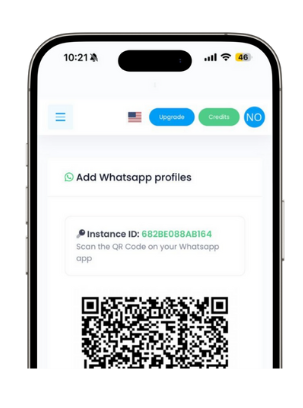
3. Connect Your WhatsApp (Scan QR)
Log in to the Wabot dashboard, go to WA Profile, scan QR code by Link a Device on WhatsApp.
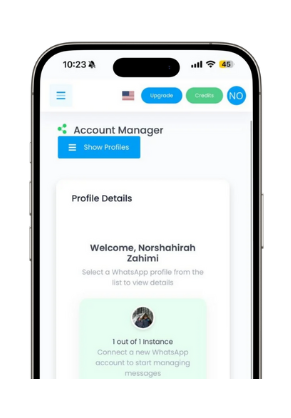
4. Start Using & Explore Features
Once your WhatsApp account linked, you’re ready to use Wabot right away.
Start for Free Now
Free Trial Lifetime | No Credit Card Needed
Start for Free Now
FAQ
Wabot is a platform that helps you automatically send WhatsApp messages to prospects or buyers using your own phone.
You simply scan a QR code within the Wabot system—just like WhatsApp Web. Once scanned, Wabot gains access to send WhatsApp messages via your phone.
No. Wabot is an independent service and is not affiliated with, sponsored by, or endorsed by WhatsApp or Facebook.
Technically, yes. However, it’s not recommended due to the high risk of your WhatsApp account being banned. If you must use it, avoid spamming unknown numbers. Wabot cannot take responsibility for bans resulting from broadcasts
Yes—Wabot supports basic AutoReply functionality based on keyword triggers or using AI.
Yes. Using AI requires additional AI Credits. The amount of credits used depends on your usage (number of leads & responses) as well as the GPT model applied
AI credit consumption is not the same for every response. It depends on the complexity of the response, the input provided, the output generated, and the GPT model used. However, every credit deduction can be tracked and monitored in the AI Log.
No. Wabot works even if your phone is turned off or offline. Broadcasts, chatbots, and notifications will continue to operate from the server.
Each subscription (for plan Plus, Basic & Lite) is valid for one WhatsApp number. You can subscribe multiple times to use more than one number on the same account.
The risk is very low—unless you use Wabot for mass broadcasts. Using it for notifications or chatbot functionality should be safe.
You can file an appeal with WhatsApp—or register a new number with Wabot.
Yes. You can “unpair” or “logout” from the current instance and then “pair” with a new number anytime